The fine follks over at NewYork-Presbyterian Hospital are looking for a designer/developer to join their 5-person Intranet team. This year, they will be redesigning their employee intranet and moving from a static website to a role-based portal. They will also be implementing a new CMS to run the show.So if you’re an experienced designer/developer with good information architecture skills (an ar comfortable working in a Microsoft shop) who is interested in leading a team (not just coding alone in the dark), give them a shout.
Dispatches From The Internets
Job: NewYork-Presbyterian Hospital
I wish I’d known that…

“Geek Camp” wrap-up

Touchdown…

I missed it

Further adventures in indifference
As opposed to just adding it to the comments in my original post, I decided to post the continuation of my email conversation with the unnamed executive at my former employer about the Target.com lawsuit as a new entry. This is mostly for Derek’s amusement, but I thought of a few other things to say on the subject as well.
PNG color oddities in IE
While working on a new site, I started playing around a little more with 8-bit PNG files, comparing them to GIFs. In a few cases the PNG was smaller (it didn’t used to be that way, but perhaps Photoshop CS2 does a better job of compressing PNG files or something), so used it. All was good until I started testing the design in IE, where the colors were all off. Here’s a breakdown of how the same graphic (placed as a CSS background image against a background color equal to its own background color) rendered between the two browsers: 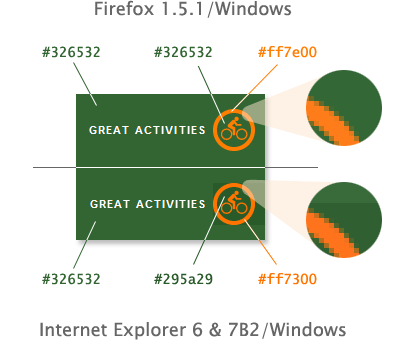
I am well-aware of the issues regarding IE’s handling of alpha transparency in 24-bit PNGs, but had not heard of any color-related issues with 8-bit PNGs in IE6. I did a test in IE7B2 to see if the error was there too and it was.
Leap.
Well, after much debate and deep deliberation, I did it. I quit my job.
Google Measure Map?!?
Just when you though all the good purchases were going to Yahoo!, Google ups the ante by picking up Measure Map, the wonderful blog stats analytics tool from my friends at Adaptive Path. Measure Map is what web analytics should be all about—it is so simple and so addictive, no wonder Google had to have it.
Apparently some people just don’t care
On WaSP today, Derek wrote an incredibly poignant post about the NFB lawsuit against Target. In fact, I thought it so relevant to the interactive work we do at Cronin and Company (the ad agency I work for), that I forwarded a copy of it to everyone who works there. The reaction was, for the most part, pretty good (at least from those that read it), but there’s always at least one person who just doesn’t get it.