Can Your AI Pass the Accessibility Test?

Last week at Microsoft Build, Jessie Lorenz, Carie Fisher, and I gave a short talk on a question every AI-enabled product team should be asking: can your AI pass the accessibility test?
The core point was straightforward: AI does not fix a broken process; it accelerates whatever process you already have. If accessibility is already in the workflow, AI can help scale inclusion. If it’s not, AI will scale the same barriers teams are already shipping.
Full Transcript
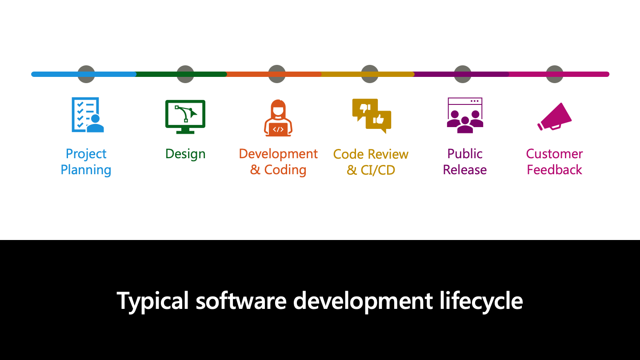
Jessie Lorenz: Everybody here ships software on a pipeline that looks something like this, right? Planning, design, development and coding, code review and CI/CD, public release, and then feedback. And then you kind of turn around and start the whole merry-go-round again, incorporating feedback back into planning.
It is a six-stage pipeline. You know it. I know it too. I know it as a blind PM at Microsoft and I know it as someone who was born blind and often encounters the accessibility errors or barriers that get shipped.
So hold on to this pipeline, because everything we are about to talk about lands somewhere on it.
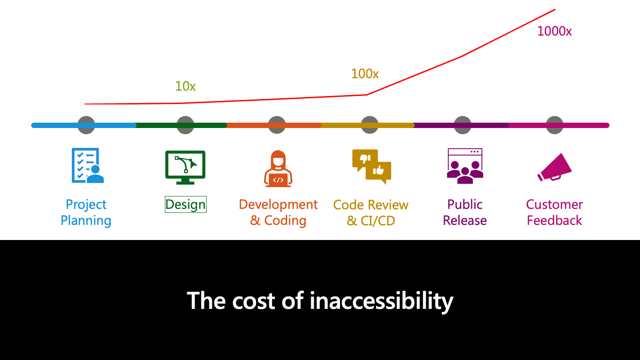
Jessie: Let us look at what happens when you solve your accessibility issues in the planning process. If you do that, it is a conversation. It is usually free to fix.
Wait until design? Well, it is going to cost you ten times more. Wait until it reaches development? One hundred times more. If you do not notice your accessibility barriers until they actually ship, it compounds even more: one thousand times more.
And each order of magnitude that compounds, if you really think about it, is a person, and multiples of people, being locked out of what you ship.
Accessibility debt is a lot like security debt, and you would not just let security debt lie. Accessibility debt should be treated the same.
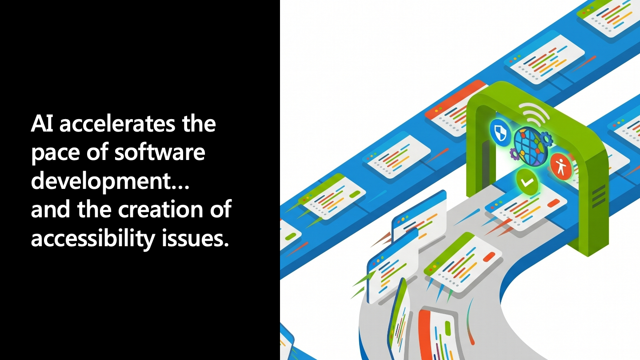
Jessie: So we’re all excited about AI, right? Well, it accelerates the pace of software development and it also accelerates the creation of accessibility barriers. Both sides of the coin are true.
Why? AI is trained largely on a web that is inaccessible. AI learned from a web that is primarily inaccessible, full of barriers, and AI ships these barriers faster and in places where we’ve not seen them before.
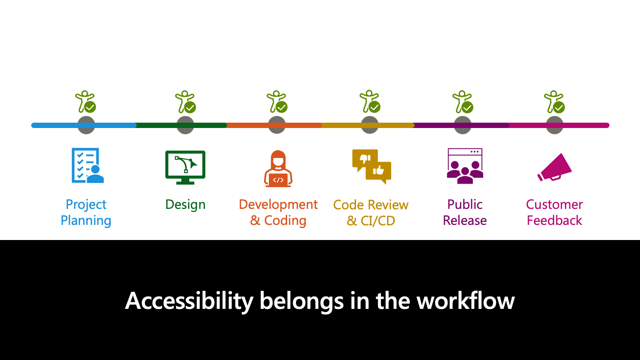
Jessie: Accessibility belongs in your workflow. We are talking today not about slowing things down, not about trying to make things harder. We are actually talking about catching things early, catching things when they are cheaper, and implementing accessibility checks in every stage of the workflow.
That could be a lint rule in the editor. That could be a gate in CI. It could be a flag in code review. It is the same workflow that we talked about before, the same pipeline. It is just that each step has an accessibility check on it.
Jessie: I really hope I can make this real for you.
People are always coming to talk to me about how to get money for their accessibility ideas. One guy came and talked to me and he was trying to get VC funding to re-carpet the San Francisco airport. He thought it would be a really good idea to give blind people canes that could guide them on this special carpet and the canes would have Bluetooth in them.
Well, I saw this guy’s demo. He actually had some investor money lined up, and I asked him one simple question. It is the question I ask everyone: Did you talk to a single person with disabilities before creating this demo?
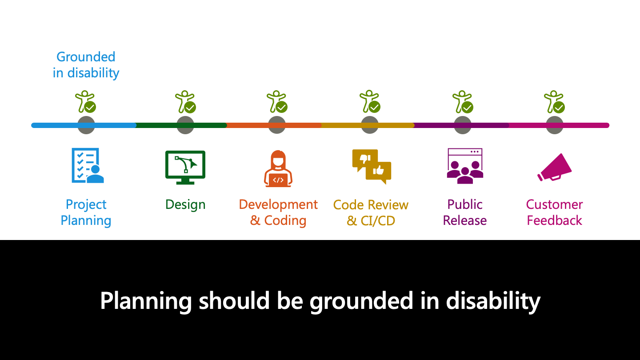
The answer to my question is all too often no. Unfortunately, this is an example of what ungrounded planning looks like. You have a clever solution, but you are not solving the right problem.
So the first step in creating an accessible software development lifecycle is to make sure accessibility is in your planning documents. That could be a question about how your feature will serve people with disabilities in a PR/FAQ. But if you do not put us in the roadmap, you are going to end up building something really beautiful that is answering the wrong question.
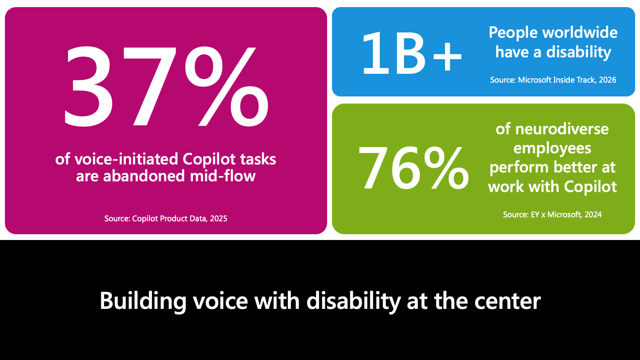
Jessie: My team in Microsoft AI is building voice-first features in Copilot, and we have data that shows 37% of voice-initiated tasks in Copilot are abandoned. That is not good.
We also have data that shows that more than one billion people in the world live with some kind of disability, a limitation to one or more major life activities. And 76% of folks who have dyslexia or other neurological impairments say that they are better at work when they can use Copilot.
So what the data shows us is that when Copilot voice breaks, it hits the people who need it most first and hardest. That is why we created a feature called Speak to Done, and that is how it got on our roadmap.
Now I am going to pass it to Aaron.
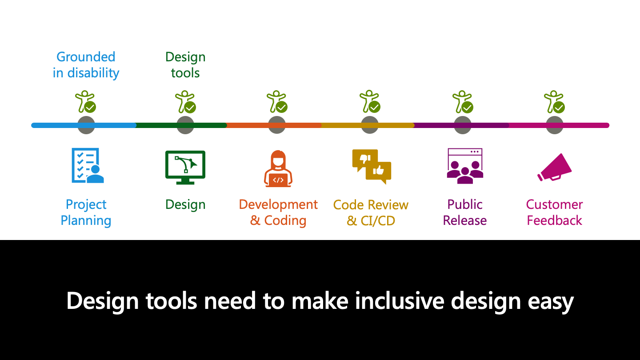
Aaron Gustafson: Once the planning is done, most teams begin designing the user experience and the user interface. Now, whether they are using traditional design software or newer vibe-design approaches, it is imperative that designers have the right tools and information to help them make accessible choices.
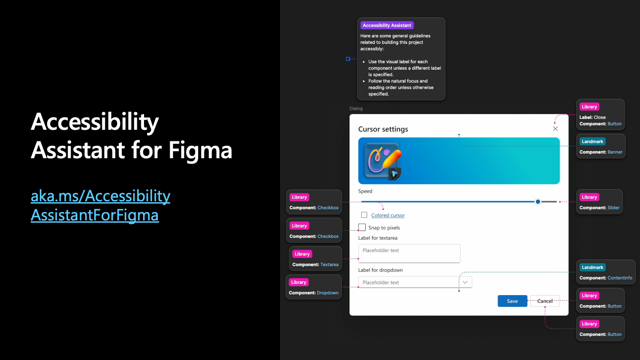
Aaron: One of the efforts that I have had the pleasure of working on in this space is the Accessibility Assistant plugin for Figma. It offers a suite of tools to help designers clarify the intent of their interface and assess the quality of their design when it comes to supporting people with disabilities.
Here on the screen I have a visual showing an annotated UI. Those annotations can actually act as an accessibility spec to guide engineering work. In fact, we are working on a new feature that will allow designers to export this accessibility information and hand that off to developers, whether they are human or whether they are agentic.
We have seen some really positive results from our early tests of handing off that accessibility spec to agentic workflows, both in being able to fix existing bugs in the interface based on the accessibility spec and in being able to build interfaces from scratch. They are even able to take simple things like an example row in a grid and extrapolate the accessibility annotations for that one row out to all the rows within the grid, which is really exciting.
The demo also shows one of the visualization tools that we have. We have a bunch of tools we are adding in for designers to help them understand how their designs end up being understood or experienced by people. In this case, we have done a focus order overlay to visually display how somebody would move through the interface.
By having this information early, and as Jessie said, in a way that is very cheap to make changes, improving accessibility at the design stage can take mere moments, but it can have a huge impact. It costs a lot more to change that once it is already ensconced in code.
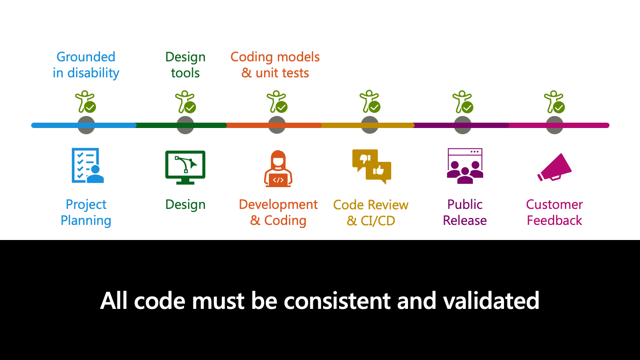
Aaron: Even with a rigorous design system and robust accessibility specs, it’s still critical to embed accessibility into the coding process. As Jessie mentioned at the beginning of this talk, that becomes even more critical in the era of AI-assisted coding.
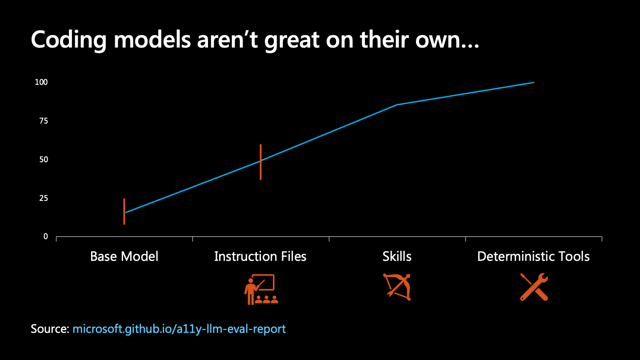
Aaron: Out of the box, most coding agents are pretty terrible when it comes to accessibility. That’s not surprising though. As Jessie said, they’re trained on what we created, and the web we created has not been all that accessible, so they learned from us.
Left to their own devices, most of the code they write only passes about 8–25% of automatable accessibility checks.
Instruction files are often touted for their ability to steer models toward better outcomes by teaching them what the accessibility expectations should be up front, but even with that the pass rate only climbs to 37–60% of automatable checks.
When you start imbuing agents with skills, you get closer to a pass rate of roughly 86%, but it is not until you give them actual deterministic tests to run, and instructions on how to use them, that you get them to iterate until the code passes all of those automatable checks.
But even that only gets you so far because it takes you to the limit of what is testable purely in an automated fashion, via unit tests and integration tests. It does not cover things like usability, so I want to put it in context: automatable tests only cover about 50% of what you need for a UI to be considered truly accessible.
Still, every step in the right direction counts. And now that we have discussed accessibility in the code authoring context, I am going to hand it off to Carie to talk about embedding accessibility in the code review process.
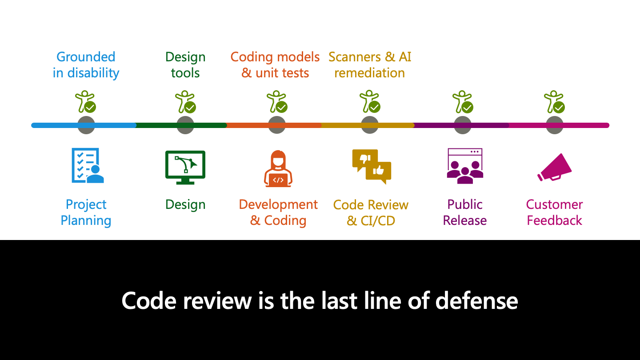
Carie Fisher: I am from GitHub, and we made an Accessibility Scanner. It’s open source. If you have not checked out the booth, we have a demo there.
What we are talking about here is bringing accessibility alongside the other feedback developers already expect. In pull requests, it should show up alongside code quality and security feedback. In CI/CD, accessibility checks should run where automation makes sense, whether you are using GitHub Actions, Azure Pipelines, browser tests, or deterministic tests. We want to be where you are and make sure accessibility is considered.
After release, issues and feedback should flow back into the backlog and into better patterns for next time. The PR is necessary, but it is not enough. If accessibility only appears at the end, we are still fixing after the fact.
The bigger direction here is to embed accessibility into AI tooling and engineering practices so innovation scales inclusion, not exclusion.
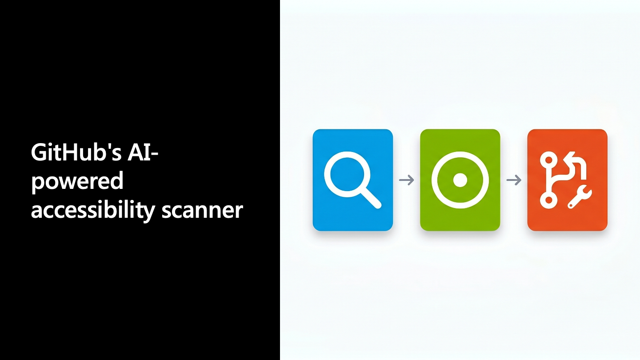
Carie: GitHub’s AI-powered Accessibility Scanner makes that workflow concrete with a simple loop: Find, File, Fix.
First, it helps find repeatable accessibility issues. Then it files actionable GitHub issues instead of leaving teams with a separate report that lives outside their workflow. And then those issues become useful context for fixing, including with Copilot-assisted remediation.
Under the hood, we’re using Deque’s aXe ruleset, which is basically the gold standard for automated accessibility checks. It is free, it is open source, and we created the GitHub workflow around it so you can scan your page for accessibility errors, create issues, and then even assign those issues to Copilot to draft a pull request.
We deliberately left a spot for a human to stay in the loop and make sure the result is truly accessible. As Aaron and Jessie have said, automated checks may only catch about half of the issues overall. You still need manual checks and you still need to work with people with disabilities to make sure your product is really inclusive.
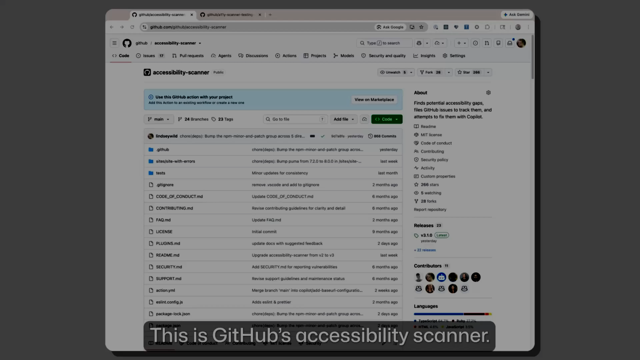
Carie: We don’t have time to run through the full demo on stage, but this is the workflow we wanted people to remember. Accessibility is not happening in a separate process. It is part of the same system teams already use to build, triage, review, automate, and ship.
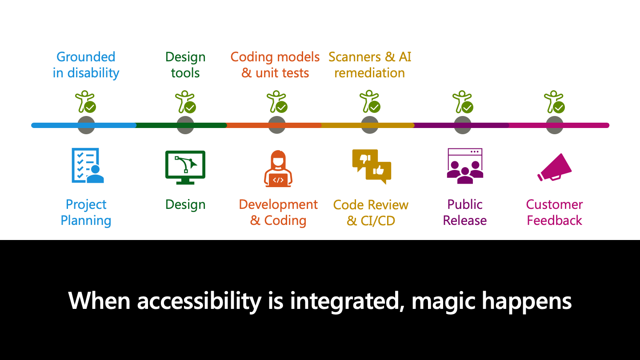
Carie: When accessibility is integrated, magic happens.
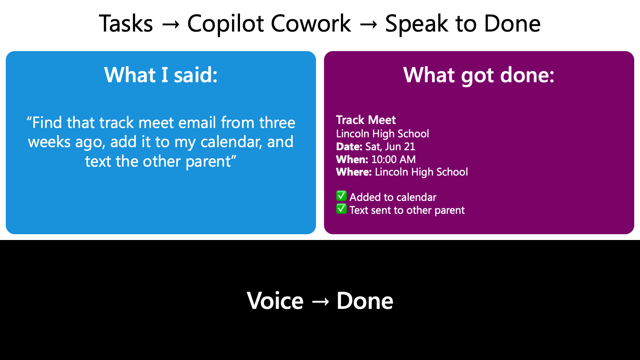
Jessie: I am a blind PM at Microsoft and most days I spend them telling software what I want it to do and then spending an inordinate amount of time cleaning up what it did wrong.
My team owns two really powerful features called Copilot Tasks and Copilot Cowork. They are super powerful. However, they did not have voice included in them, so we created a feature called Speak to Done, which is the voice layer over Copilot Tasks and Copilot Cowork.
I said, “Find that track meet email from three weeks ago, add it to my calendar, and text the other parent.”
Copilot did not lose context, did not break, found the track meet in the Gmail thread, put it on the calendar, and sent it to the other parent without breaking.
Now let me be clear: without the shift-left practices, without the tools that we talked about today, the Figma plugin at the design process, the deterministic testing, the code review, none of these features reach me.
Speak to Done is really cool because it solves a problem that disproportionately impacts folks with disabilities, like we talked about earlier, but it also helps everybody who wants to use Copilot with their voice.
In disability circles, we talk a lot about the curb-cut effect. Back in the 1960s, they did not have curb cuts. Wheelchair users in Berkeley literally started taking sledgehammers to the curbs and making them themselves. Now we see curb cuts everywhere, and who benefits? People who use strollers, delivery workers, all of society.
That is a little bit of what we are trying to convey today. When we are talking about the things we build, we are not talking about tools. We are talking about who gets to use what we ship.
I encourage you to be conscious about creating a more accessible world, one code snippet at a time.
If you want to dig into the tools we referenced, here is the resource page for the talk.
Webmentions
Likes
Shares